
n8n pricing differs between Cloud and self-hosted deployments, even though both use the same automation engine: the costs and responsibilities do not fall on your SMB in the same way. Cloud charges for a managed service; self-hosting gives you more control but leaves you responsible for infrastructure, security, backups, and maintenance.[2]
As of August 5, 2026, the official pricing page viewed from France lists Cloud Starter at €20/month and Cloud Pro at €50/month, billed annually. The Business plan, at €667/month, is a self-hosted offering with 40,000 monthly executions; Enterprise requires a custom quote, for either Cloud or self-hosted deployment. Displayed prices and monthly billing rates may differ: check the terms offered to your account before signing up.[1]
Comparing n8n Cloud and self-hosted pricing is therefore not just about server costs: consider the total cost, team features, operational workload, and responsibility for your data.
The key takeaway
Without access to systems administration expertise, n8n Cloud is generally the safer starting point.[2] Self-hosting makes sense when you have a clear reason to control the environment and someone responsible for updates, backups, alerts, and incidents. There is no universal break-even point: calculate the total cost for your situation.
Quick verdict: Cloud to delegate infrastructure management, self-hosted to control it
Choose n8n Cloud if your priority is to launch quickly without installing or maintaining a server. n8n handles hosting, updates, and scaling; its documentation also recommends this option for teams without technical expertise.[2]
Choose n8n self-hosted if you need to control the environment, integrate specific components, or apply your own operational policies. The Community Edition is free and includes the core product, but some organizational and governance features—shared projects, SSO, environments, external secrets, or Git—require a paid plan.[2][3]
The best choice is therefore not “the cheapest option on the pricing page.” It is the one your business can keep running for twelve months, including during an outage, an update, or the departure of the person who knows the system.
n8n pricing verified on August 5, 2026: what the official plans let you compare
The official pricing page bases plan pricing on monthly executions, regardless of the number of steps in a workflow. An execution is one complete workflow run, even if it contains multiple steps.[1]
| Option | Listed price, billed annually | Included executions | Hosting | Who is it for? |
|---|---|---|---|---|
| Cloud Starter | €20/month | 2,500/month | Managed by n8n | Getting started, low volume, and a need for simplicity |
| Cloud Pro | €50/month | 10,000/month | Managed by n8n | Advanced individual users or small teams running production workflows |
| Business | €667/month | 40,000/month | Self-hosted | Teams that need collaboration, SSO, and separate environments |
| Enterprise | Custom quote | Custom | Cloud or self-hosted | Advanced governance, security, retention, and support |
| Community Edition | Free software | No execution quota sold by n8n; capacity limited by your infrastructure | Your responsibility | Technical teams willing to manage the infrastructure |
Check before buying: these amounts were recorded on the official pricing page on August 5, 2026, for annual billing. Pricing and the features included in each edition may change: check the official pages before signing up.[1][3]
Above Cloud Pro, the publicly listed Cloud option is Enterprise with custom pricing. If you want to stay on Cloud above 10,000 monthly executions, request a quote from n8n rather than extrapolating from the Pro price.[1]
The real cost of self-hosting: calculate TCO, not just the VPS
You can use the Community Edition on your own infrastructure for free.[2][3] That does not make operating it free. The n8n documentation states that installation, hosting, and maintenance are the self-hosted user’s responsibility.[2]

Use this simple formula:
Monthly self-hosted TCO = hosting + backups + monitoring + maintenance time + incident costs + any licenses + connected APIs.
Do not substitute a generic estimate for maintenance time. Measure it in your own environment: n8n and Docker updates, regression testing, access credential renewals, monitoring, restoring a backup, and handling errors. A low-cost server can still be a good choice, but only if someone owns these responsibilities.
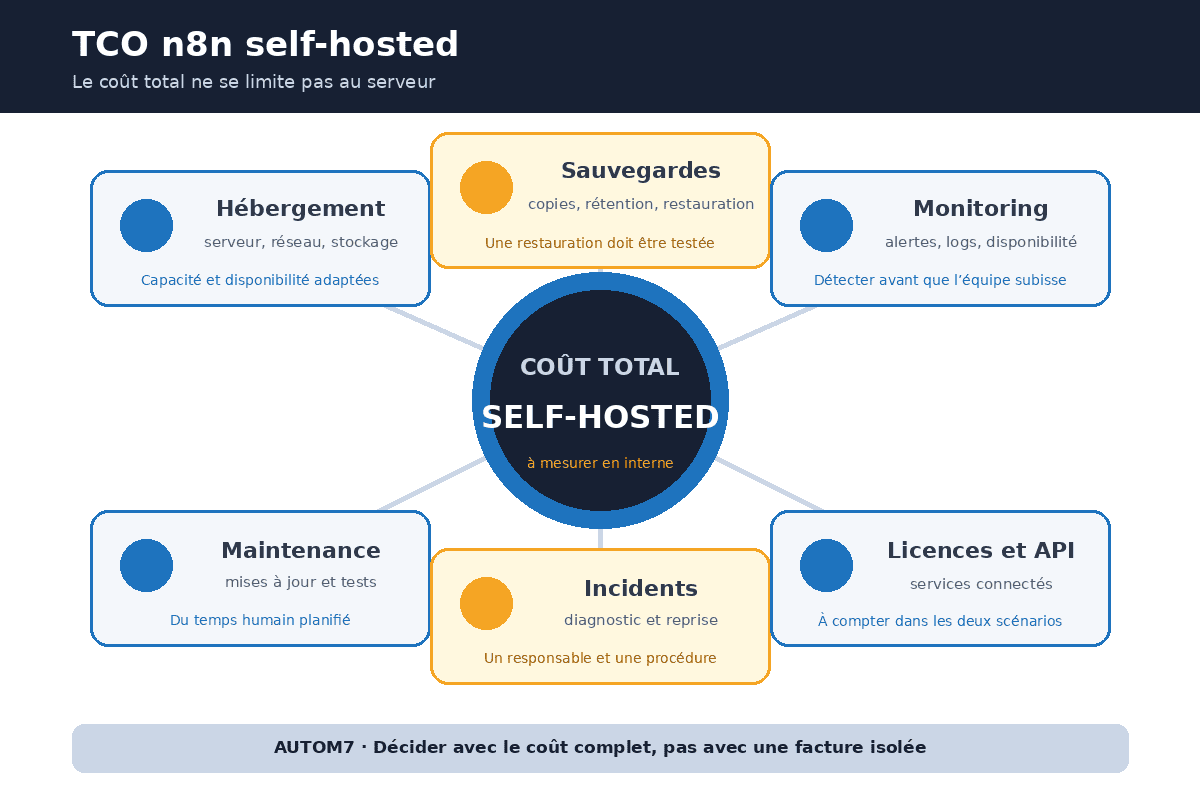
Separately, n8n platform pricing does not cover subscriptions or usage charges for services your workflows call: AI APIs, email, SMS, storage, CRM, or business tools. These expenses apply in both scenarios.
To define the process, error handling, and responsibilities first, see our guide to building a useful n8n workflow for your SMB.
Cloud vs. self-hosted: the criteria that affect your decision
| Criterion | n8n Cloud | n8n self-hosted |
|---|---|---|
| Getting started | Immediate, no installation | Installation and configuration required |
| Maintenance | Managed by n8n | Your responsibility |
| Control over the environment | Limited to the service’s available options | High |
| Free Community Edition | No | Yes |
| Advanced team features | Depends on your plan; above Pro, Enterprise requires a custom quote[1] | Business or Enterprise, depending on your needs |
| Data location | n8n lists Frankfurt, Germany, for the plans it hosts | Depends on your hosting provider and subprocessors |
| Backups, TLS, encryption, audits | Service provisions + customer responsibilities | Your responsibility to design and operate |
| In-house systems administration expertise | Not essential | Essential or outsourced |
n8n describes Cloud as fully managed and self-hosting as an option that requires installation and configuration expertise.[2] The official pricing page also states that data for plans hosted by n8n is stored in the EU, in Frankfurt.[1]
GDPR: a European VPS does not automatically make you compliant
Hosting n8n in the European Union can make it easier to control data location, but that alone does not make processing compliant “by default.”[7][8] You still need to define roles, purposes, retention periods, access rights, security measures, and contracts with processors.
For n8n Cloud, n8n states that it acts as a controller for account data and as a processor for data handled in workflows; the vendor also provides a data processing agreement that includes standard contractual clauses.[4] For a self-hosted instance, n8n specifies that it does not manage your data: deleting user data and setting retention policies are the operator’s responsibility.[4]
The documentation recommends measures including TLS, encryption at rest, security audits, restricting modules, and caution with community nodes.[5] CNIL calls for choosing processors that provide sufficient guarantees, defining security obligations in contracts, and being able to verify that those obligations are met.[7] If a connector transfers data outside the EEA, that transfer must also be covered by an appropriate mechanism.[8]
Community Edition: free and source-available, but not “open source” under the OSI definition
The Community Edition is free to self-host and covers almost all core functionality.[3] However, n8n uses a Sustainable Use License under the fair-code model. Its code is available, but n8n explicitly states that it does not describe itself as open source under the Open Source Initiative definition, because the license restricts certain commercial uses.[6]
For an SMB using n8n for its own internal processes, this framework covers typical use; if you are unsure about your situation, refer to the license text. If your business model involves reselling hosted access or building a product primarily around n8n, check the terms or request a commercial agreement.[6]
The most expensive decision-making mistakes
- Choosing self-hosting solely because the VPS is cheaper. Operating costs do not appear on the server invoice.[2][5]
- Assuming GDPR compliance based only on the hosting region. Security, contracts, access, and retention still need to be addressed.[7][8]
- Comparing managed Cloud with the Community Edition without accounting for staff time. They cover different scopes of service.
- Overlooking team features. SSO, environments, projects, external secrets, and Git may shift the choice toward Business or Enterprise.[3]
- Sizing your plan by the number of nodes. n8n plans are billed per complete execution, not per step.[1]
- Leaving only one person in control of the system. Document recovery, alerts, backups, and incident procedures.
Which option fits your situation?
Getting started or running a small team without a systems administrator
Start with Cloud Starter if 2,500 monthly executions are enough, then monitor actual usage. Move to Pro if you need 10,000 monthly executions or its associated management features.[1]
Small team with production workflows
Choose Cloud Pro if availability and the time saved on operations matter more than server control.[1][2] It is often the clearest option when no one is formally responsible for Linux, Docker, backups, and monitoring.
SMB with technical expertise and a need for control
Evaluate the self-hosted Community Edition if you have someone responsible for operations, a tested backup plan, and specific customization needs. Do not choose this option solely to avoid a €20 or €50 subscription.
Team requiring SSO, environments, or stronger governance
Compare self-hosted Business and Enterprise. The choice depends less on headcount than on requirements for permissions, environment separation, traceability, and support.[1][3]
When neither option is the right question yet
If the process you want to automate is not yet stable, no one can name the person responsible for operations, or the data being processed has not been mapped, choosing between Cloud and self-hosting is premature. These three factors affect the calculation more than the difference between €20 and €50 per month.
If your team also needs to build its skills, see how to choose n8n training without confusing learning the tool with operating it in production.
Checklist before you decide
- Estimate monthly executions by trigger, not by the number of nodes.
- Identify the paid APIs and services called in both scenarios.
- Name the person responsible for updates, backups, alerts, and incidents.
- Check whether SSO, projects, environments, Git, or external secrets are essential.
- Document the personal data processed, its retention periods, and the processors involved.
- Test restoring a backup before declaring your self-hosted deployment “ready.”
- Recheck official pricing on the day you decide.[1]
Frequently asked questions
How much does n8n Cloud cost in 2026?
As of August 5, 2026, Starter is listed at €20/month with 2,500 executions and Pro at €50/month with 10,000 executions, billed annually. Check the official page before buying, as pricing may change.[1]
Is self-hosted n8n free?
How many executions make self-hosting cost-effective?
There is no universal threshold. Compare Cloud pricing with self-hosted TCO: infrastructure, operations, incidents, any licenses, and the cost of staff time.
Is self-hosting on a European VPS GDPR-compliant?
Is n8n open source?
n8n describes itself as fair-code and source-available under the Sustainable Use License. The vendor explicitly states that it does not use “open source” in the OSI sense because of commercial use restrictions.[6]
Sources
- n8n Plans and Pricing, accessed August 5, 2026.
- Choose how to use n8n, accessed August 5, 2026.
- Compare n8n editions, accessed August 5, 2026.
- n8n Privacy, accessed August 5, 2026.
- n8n self-hosting security responsibilities, accessed August 5, 2026.
- n8n Sustainable Use License, accessed August 5, 2026.
- CNIL — Managing data processors, accessed August 5, 2026.
- CNIL — Data transfers outside the EU, accessed August 5, 2026.
Review your website before deciding what to improve
Start with a free assessment of the visible obstacles in your website and enquiry journey.
For businesses with 5 to 40 employees. Free, with no obligation.